NanoCore is one of the most powerful RATs ever created. It is capable of taking complete control of a victim's machine. It allows a user to control the system with a Graphical User Interface (GUI). It has many features which allow a user to access remote computer as an administrator. Download nanocore rat 1.2.2.0 cracked version free of cost.
NanoCore's developer was arrested by FBI and pleaded guilty in 2017 for developing such a malicious privacy threat, and sentenced 33 months in prison.
FEATURES
Complete Stealth Remote Control
Recover Passwords from the Victim Device
Manage Networks
Manage Files
Surveillance
Plugins (To take it to the next level)
Many advanced features like SCRIPTING
DOWNLOAD NANOCORE RAT 1.2.2.0 CRACKED – REMOTE ADMINISTRATION TOOL
Printers belong arguably to the most common devices we use. They are available in every household, office, company, governmental, medical, or education institution.
From a security point of view, these machines are quite interesting since they are located in internal networks and have direct access to sensitive information like confidential reports, contracts or patient recipes.
TL;DR: In this blog post we give an overview of attack scenarios based on network printers, and show the possibilities of an attacker who has access to a vulnerable printer. We present our evaluation of 20 different printer models and show that each of these is vulnerable to multiple attacks. We release an open-source tool that supported our analysis: PRinter Exploitation Toolkit (PRET) https://github.com/RUB-NDS/PRET
Full results are available in the master thesis of Jens Müller and our paper.
Furthermore, we have set up a wiki (http://hacking-printers.net/) to share knowledge on printer (in)security. The highlights of the entire survey will be presented by Jens Müller for the first time at RuhrSec in Bochum.
Background
There are many cool protocols and languages you can use to control your printer or your print jobs. We assume you have never heard of at least half of them. An overview is depicted in the following figure and described below.
Device control
This set of languages is used to control the printer device. With a device control language it is possible to retrieve the printer name or status. One of the most common languages is the Simple Network Management Protocol (SNMP). SNMP is a UDP based protocol designed to manage various network components beyond printers as well, e.g. routers and servers.
Printing channel
The most common network printing protocols supported by printer devices are the Internet Printing Protocol (IPP), Line Printer Daemon (LPD), Server Message Block (SMB), and raw port 9100 printing. Each protocol has specific features like print job queue management or accounting. In our work, we used these protocols to transport malicious documents to the printers.
Job control language
This is where it gets very interesting (for our attacks). A job control language manages printer settings like output trays or paper size. A de-facto standard for print job control is PJL. From a security perspective it is very useful that PJL is not limited to the current print job as some settings can be made permanent. It can further be used to change the printer's display or read/write files on the device.
Page description language
A page description language specifies the appearance of the actual document. One of the most common 'standard' page description languages is PostScript. While PostScript has lost popularity in desktop publishing and as a document exchange format (we use PDF now), it is still the preferred page description language for laser printers. PostScript is a stack-based, Turing-complete programming language consisting of about 400 instructions/operators. As a security aware researcher you probable know that some of them could be useful. Technically spoken, access to a PostScript interpreter can already be classified as code execution.
Attacks
Even though printers are an important attack target, security threats and scenarios for printers are discussed in very few research papers or technical reports. Our first step was therefore to perform a comprehensive analysis of all reported and published attacks in CVEs and security blogs. We then used this summary to systematize the known issues, to develop new attacks and to find a generic approach to apply them to different printers. We estimated that the best targets are the PostScript and PJL interpreters processing the actual print jobs since they can be exploited by a remote attacker with only the ability to 'print' documents, independent of the printing channel supported by the device.
We put the printer attacks into four categories.
Denial-of-service (DoS)
Executing a DoS attack is as simple as sending these two lines of PostScript code to the printer which lead to the execution of an infinite loop:
Other attacks include:
Offline mode. The PJL standard defines the OPMSG command which 'prompts the printer to display a specified message and go offline'.
Physical damage. By continuously setting the long-term values for PJL variables, it is possible to physically destroy the printer's NVRAM which only survives a limited number of write cycles.
Showpage redefinition. The PostScript 'showpage' operator is used in every document to print the page. An attacker can simply redefine this operator to do nothing.
Protection Bypass
Resetting a printer device to factory defaults is the best method to bypass protection mechanisms. This task is trivial for an attacker with local access to the printer, since all tested devices have documented procedures to perform a cold reset by pressing certain key combinations. However, a factory reset can be performed also by a remote attacker, for example using SNMP if the device complies with RFC1759 (Printer MIB):
Other languages like HP's PML, Kyocera's PRESCRIBE or even PostScript offer similar functionalities.
Furthermore, our work shows techniques to bypass print job accounting on popular print servers like CUPS or LPRng.
Print Job Manipulation
Some page description languages allow permanent modifications of themselves which leads to interesting attacks, like manipulating other users' print jobs. For example, it is possible to overlay arbitrary graphics on all further documents to be printed or even to replace text in them by redefining the 'showpage' and 'show' PostScript operators.
Information Disclosure
Printing over port 9100 provides a bidirectional channel, which can be used to leak sensitive information. For example, Brother based printers have a documented feature to read from or write to a certain NVRAM address using PJL:
Our prototype implementation simply increments this value to dump the whole NVRAM, which contains passwords for the printer itself but also for user-defined POP3/SMTP as well as for FTP and Active Directory profiles. This way an attacker can escalate her way into a network, using the printer device as a starting point. Other attacks include:
File system access. Both, the standards for PostScript and PJL specify functionality to access the printers file system. As it seems, some manufacturers have not limited this feature to a certain directory, which leads to the disclosure of sensitive information like passwords.
Print job capture. If PostScript is used as a printer driver, printed documents can be captured. This is made possible by two interesting features of the PostScript language: First, permanently redefining operators allows an attacker to 'hook' into other users' print jobs and secondly, PostScript's capability to read its own code as data allows to easily store documents instead of executing them.
Credential disclosure. PJL passwords, if set, can easily retrieved through brute-force attacks due to their limited key space (1..65535). PostScript passwords, on the other hand, can be cracked extremely fast (up to 100,000 password verifications per second) thanks to the performant PostScript interpreters.
PRET
To automate the introduced attacks, we wrote a prototype software entitled PRET. The main idea of PRET is to facilitate the communication between the end-user and the printer. Thus, by entering a UNIX-like command PRET translates it to PostScript or PJL, sends it to the printer, and evaluates the result. For example, PRET converts a UNIX command ls to the following PJL request:
It then collects the printer output and translates it to a user friendly output.
PRET implements the following list of commands for file system access on a printer device:
Evaluation
As a highly motivated security researcher with a deep understanding of systematic analysis, you would probably obtain a list of about 20 - 30 well-used printers from the most important manufacturers, and perform an extensive security analysis using these printers. However, this was not our case. To overcome the financial obstacles, we collected printers from various university chairs and facilities. While our actual goal was to assemble a pool of printers containing at least one model for each of the top ten manufacturers, we practically took what we could get. The result is depicted in the following figure:
The assembled devices were not brand-new anymore and some of them were not even completely functional. Three printers had physically broken printing functionality so it was not possible to evaluate all the presented attacks. Nevertheless, these devices represent a good mix of printers used in a typical university or office environment.
Before performing the attacks, we of course installed the newest firmware on each of the devices. The results of our evaluation show that we could find multiple attacks against each printer. For example, simple DoS attacks with malicious PostScript files containing infinite loops are applicable to each printer. Only the HP LaserJet M2727nf had a watchdog mechanism and restarted itself after about ten minutes. Physical damage could be caused to about half of the tested device within 24 hours of NVRAM stressing. For a majority of devices, print jobs could be manipulated or captured.
PostScript, PJL and PML based attacks can even be exploited by a web attacker using advanced cross-site printing techniques. In the scope of our research, we discovered a novel approach – 'CORS spoofing' – to leak information like captured print jobs from a printer device given only a victim's browser as carrier. A proof-of-concept implementation demonstrating that advanced cross-site printing attacks are practical and a real-world threat to companies and institutions is available at http://hacking-printers.net/xsp/.
Our next post will be on adapting PostScript based attacks to websites.
A bug bounty program, also called a vulnerability rewards program (VRP), is a crowdsourcing initiative that rewards individuals for discovering and reporting software bugs. Bug bounty programs are often initiated to supplement internal code audits and penetration tests as part of an organization's vulnerability management strategy.
Many software vendors and websites run bug bounty programs, paying out cash rewards to software security researchers and white hat hackers who report software vulnerabilities that have the potential to be exploited. Bug reports must document enough information for for the organization offering the bounty to be able to reproduce the vulnerability. Typically, payment amounts are commensurate with the size of the organization, the difficulty in hacking the system and how much impact on users a bug might have.
Mozilla paid out a $3,000 flat rate bounty for bugs that fit its criteria, while Facebook has given out as much as $20,000 for a single bug report. Google paid Chrome operating system bug reporters a combined $700,000 in 2012 and Microsoft paid UK researcher James Forshaw $100,000 for an attack vulnerability in Windows 8.1. In 2016, Apple announced rewards that max out at $200,000 for a flaw in the iOS secure boot firmware components and up to $50,000 for execution of arbitrary code with kernel privileges or unauthorized iCloud access.
While the use of ethical hackers to find bugs can be very effective, such programs can also be controversial. To limit potential risk, some organizations are offering closed bug bounty programs that require an invitation. Apple, for example, has limited bug bounty participation to few dozen researchers.
How To Change Facebook's Default Theme To Any Color You Want
We are going to share an interesting trick on changing your Facebook default theme. You just need a Google Chrome extension to perform this trick. If you are among me who feels very fatigued with the look of Facebook's by default theme then this is a must-see post because you will find out the easiest trick to make your facebook more attractive than before.
Facebook is a social networking site which empowers people to connect with friends and people around. That's how Facebook is habitually introduced. However, Facebook is beyond the need of being introduced as almost everyone is on it.
A couple of Days ago I was simply Surfing Google Chrome website and I somehow stumbled upon a Chrome Extension. Yes, a Chrome extension that will give your Facebook a Whole new look. I was apprehensive to try it, So I just installed it and checked my facebook. I was astonished to see my facebook homepage have all new look. I found it refreshing and decided to write steps on How to Change Facebook Themes using Chrome Extension.
How To Change Facebook's Default Theme To Any Color You Want
If You are among me who feels very fatigued with the look of Facebook's by default theme then this is a must-see post, Because you will find out the easiest trick to make your facebook more attractive than before. Simply follow the steps to know about it.
How to Change Facebook Theme Using Chrome Extension
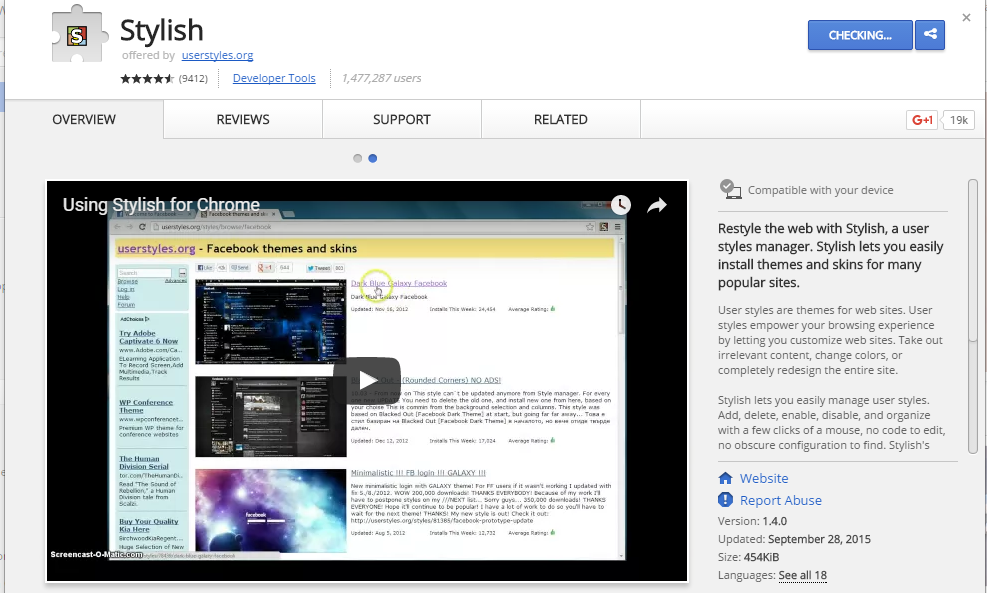
Step 1. Install Stylish for Chrome from the Chrome Web Store. It will take hardly a minute to get installed in your Chrome browser.
Change Facebook Theme Using Chrome Extension
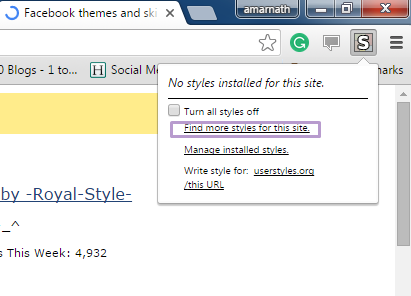
Step 2. Navigate to Facebook.com and click on the S button. Click on Find Styles for this Site to open a new tab with free themes to use for Facebook. Most of the themes are free and attractive too you can easily browse over the full website to discover your favorite theme.
Change Facebook Theme Using Chrome Extension
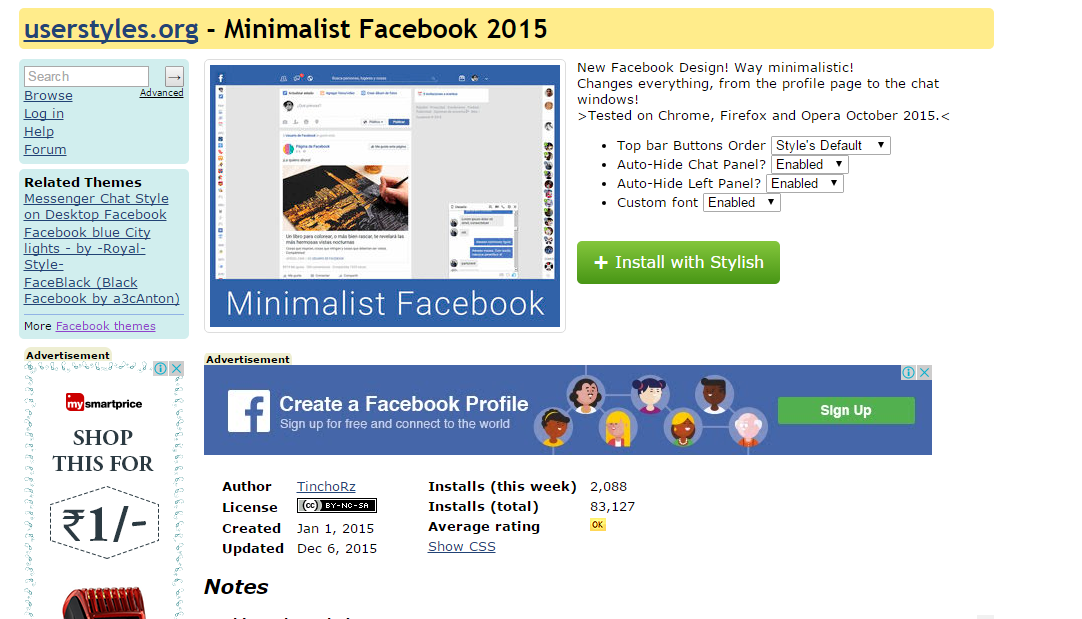
Step 3. Now You will be redirected towards https://userstyles.orgGuess what! This site contains huge numbers of Facebook themes, One thing is for sure that you will be confused in-between what to select and which one to skip. Select any them and click on it. Now you will be given a full preview of your selected theme.
Change Facebook Theme Using Chrome Extension
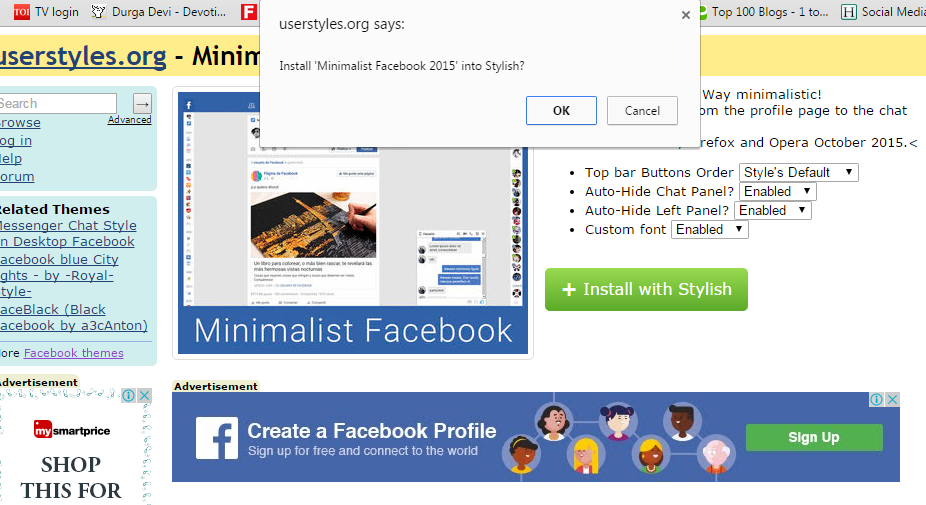
Step 4. If everything is fine in the previewed theme, click on Install with Stylish button at the top right corner of the page. It will take few seconds or minutes depends on your theme size to be installed in Stylish Extension, once installed you will be notified with a success message.
Change Facebook Theme Using Chrome Extension
Step 5. Now whenever you open Facebook, it will show the theme that you have installed with Stylish instead of the boring old blue theme.